• A notice about Rule 3 regarding sites hosting pirated/unauthorized content has been made. Please see here for details.
  • Staff is working to deal with the problem of synonymous tags. See here for more information and to suggest tag mergers.
  • Due to issues with external spam filters, QQ is currently unable to send any mail to Microsoft E-mail addresses. This includes any account at live.com, hotmail.com or msn.com. Signing up to the forum with one of these addresses will result in your verification E-mail never arriving. For best results, please use a different E-mail provider for your QQ address.
  • For prospective new members, a word of warning: don't use common names like Dennis, Simon, or Kenny if you decide to create an account. Spammers have used them all before you and gotten those names flagged in the anti-spam databases. Your account registration will be rejected because of it.
  • Since it has happened MULTIPLE times now, I want to be very clear about this. You do not get to abandon an account and create a new one. You do not get to pass an account to someone else and create a new one. If you do so anyway, you will be banned for creating sockpuppets.
  • Due to the actions of particularly persistent spammers and trolls, we will be banning disposable email addresses from today onward.

Tag system exclusion suggestion

Trying to tell the tag catagories apart better New

computer47

Making the rounds.
Joined
Feb 1, 2025
Messages
42
Likes received
450
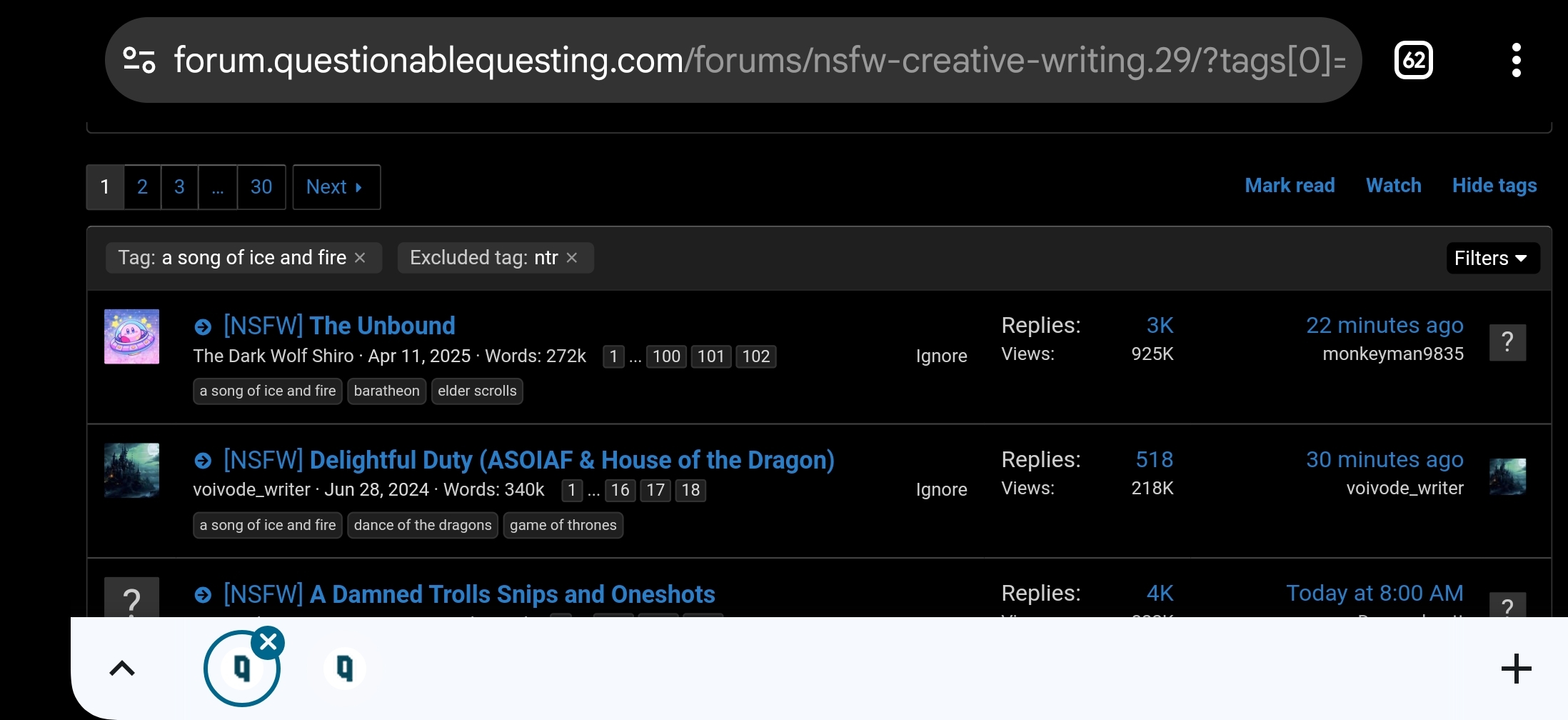
When I was searching for things, it becomes very unclear on the little hotbar which tags are included and which are excluded. Maybe I'm just missing something obvious, but if not then I suggest either putting a - sign in front of excluded tags, or some other indicator.
 
I assume you're filtering from within the subforum:
image.jpg
image.jpg
Yeah, I don't think you're missing anything, there's just no visual difference between included and excluded tags. It'd be useful to change that, but until that happens, you just have to remember which tags you're excluding and including. Or you can click on the 'filter' menu again and find out that way.
 
Last edited:
I assume you're filtering from within the subforum:
image.jpg
image.jpg
Yeah, I don't think you're missing anything, there's just no visual difference between included and excluded tags. It'd be useful to change that, but until that happens, you just have to remember which tags you're excluding and including. Or you can click on the 'filter' menu again and find out that way.
That appears to be an issue with specifically the mobile version site in portrait mode, they normally say "Tag:" or "Excluded Tag:" in front of them in landscape mode or when desktop mode is forced.
27d486b558eb.jpg
 

Users who are viewing this thread

Back
Top